
Keyboard and Gamepads
You may not have access to a guitar, especially since they've been increasing in price and are not always available in your region. But you don't need a guitar! You can play either with a gamepad or with your keyboard.
Keyboard
The keyboard is the default controller that Clone Hero uses. By default, the keyboard bindings are:
{{@11#bkmrk-mapping-key-green-a-}}
You can change these by pressing Space on the main menu to open the control mapper and customize your controls.
You need to press Start and select a profile using Strum Up/Down and Green before you can navigate the menus.
For settings, press Green to select the option, then use Strum Up/Down to change it, then use Green to confirm your selection.
If you're on keyboard and certain key combinations don't work, your keyboard has issues with "Key Rollover" or "Keyboard Ghosting" The only fixes are either rebinding keys in hopes you keyboard will register them, or buying an anti-ghosting keyboard. Learn more from this video.
NOTE: Keyboard can only be assigned to player 1, you cannot use a guitar for player 1 and keyboard for player 2. Additionally, if you are using a guitar that is emulating a keyboard, you cannot also use a keyboard for another player.
Gamepads
Most gamepads will work with Clone Hero with minimal configuration. You will need to assign the bindings in the controls menu, be sure you are using the right side of the controls table (Gamepad) and not the left side (Keyboard).
Gamepad play is considerably more difficult than keyboard or guitar play, however it is still possible to do.
{{@28#bkmrk-if-you-are-trying-to}}
{{@28#bkmrk-a-workaround-is-to-d}}
{{@28#bkmrk-you-may-also-need-to}}
{{@28#bkmrk-please-be-aware%3A-as-}}
Gamepad Mode & All Taps
When using a Gamepad or a Keyboard, you are advised to turn on either "Gamepad Mode" in the profile settings, or "All Taps" in the song modifier list.
Gamepad Mode
Once you have selected a profile, press "Start" again and scroll down, then enable "Gamepad Mode". This makes the game strum every time you press a fret button, allowing you to play without strumming.
As of v1.1, Gamepad mode was updated. Releasing a fret button will now hit the following note (similarly to Fortnite Festival's Tap Mode), provided it's in the same lane (or an open note) and timed properly.

Classic Gamepad
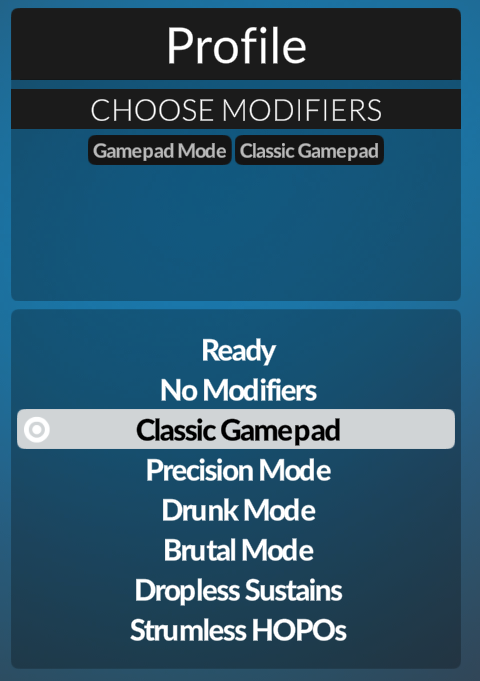
After selecting a song, open the Modifier list and scroll down to Classic Gamepad. Select it, and press either the red button or select Ready to confirm the selection. This modifier makes it so Gamepad Mode functions similarly to Guitar Hero I - III, where each note required a timed button press to be successful.
All Taps
Once you select a song, open the Modifier list and scroll down to All Taps. Select it, and either press the red button or select Ready to confirm the selection. This will turn every note into a Tap note, allowing you to play without strumming, without strumming every time you press a fret.
